02
Lessonix Studio
A platform where teachers turn their own lesson into a game, then play it in class on a motion-sensing projection system.

Role
Sole product designer
Team
Product manager, development team
Platform
Web, desktop
Status
Launched, still evolving
Redesigned for this portfolio. The problems, decisions and flows are from the real product.
Context
Lessonix makes interactive projection systems. A game is projected onto a floor, wall or table, and motion sensors let students play it with their bodies.
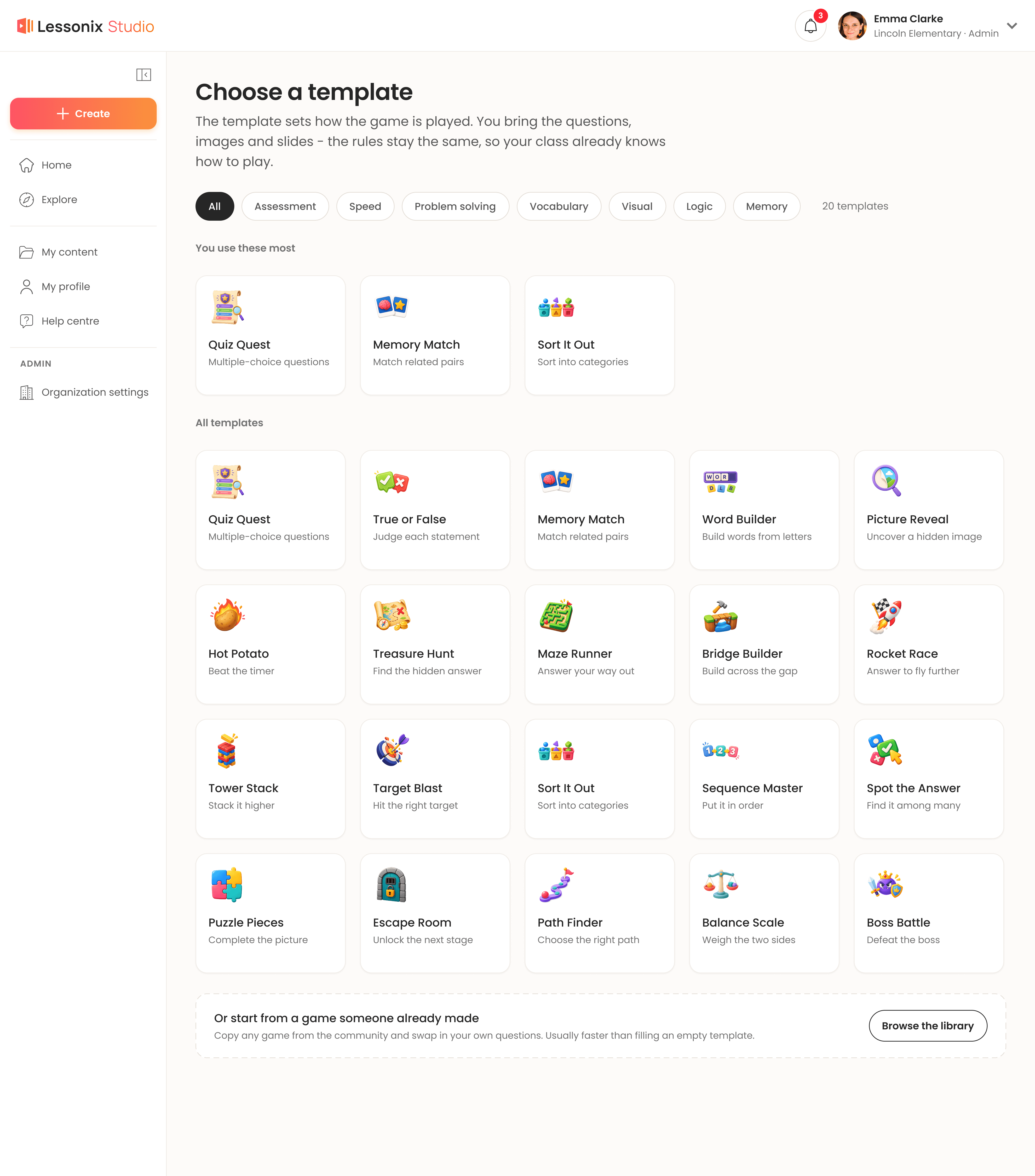
Schools that owned the systems needed a steady supply of games that matched what they were actually teaching. Studio is where teachers make them: they pick a game template, fill it with their own questions, images, videos and info slides, and the game syncs to the school's projector.
Lessonix Studio is one half of a connected system. Teachers build games here and run them in class through Lessonix Play, the classroom side, which has its own case study.
I joined while the product was still being built, as the only designer, working closely with the product manager and developers. Some of the groundwork was already in place, and I designed significant parts of the product as it took shape.
The challenge
Twenty templates, each with its own rules. Teachers didn't want to learn a complex system. They wanted a game ready for their lesson. The work was to keep that range available without making anyone feel it.
The approach
01
Choosing a template is the only decision about how the game plays. Everything after it is content. A teacher who has built one game already knows how to build the next, and their class already knows how to play it.
02
One editor for every game type.
Under the surface every template behaves differently. In the editor they share one structure: stages on the left, the current item on the canvas, formatting in a single toolbar. Only the canvas changes with the template.
That consistency paid off long after launch. New templates and features slotted into a structure teachers already knew, instead of each one needing its own experience.
03
A shared library, not a blank page.
Teachers can play games made in their own school or in others, as they are or copied and adjusted to their class, and publish their own. Over time this grew into a large library across ages, subjects and topics, so a teacher short on time never has to start from zero.
The home page runs from personal to local to global: games for your grades and subjects, then what's new from your school, then what's popular across all schools this week. A colleague's game is more likely to fit your curriculum than a global hit, and seeing colleagues publish is what gets teachers publishing too.


After launch
Because the platform was built from zero, the first release focused on the fundamentals. Once teachers were using it, their feedback reached me through the product manager and shaped what came next. Two changes had the most impact.
Create a whole game with AI
The biggest change to the product. A teacher picks a template, fills in a few basics (subject, topic, age range, language and a short description of the activity) and gets a complete game with questions, answers, videos and images. It opens as a draft in the same editor, so the teacher decides what reaches the class.

A stage for the people who create
We wanted more teachers creating, not only using what others made. So we gave the people who create a stage: a Top creators row on the home page with profiles you can visit and follow, and play and save counts on every game card. Creators are ranked by how many teachers actually played and saved their games, not by how much they publish, so the spotlight goes to content others found useful. The aim was a sense of community that makes publishing feel worthwhile.

Along the way
My content
A personal area that gathers everything in one place: the games you created, games made only by people in your organization, and your saved folders.
Seasonal packs
Rotating banners on the home page lead to curated packs for specific days, like International Recycling Day, instead of a search across the whole site.
Play in the browser
Some games became playable in the browser, straight from the platform. That let us reach a wider range of subscribers, including schools without the interactive system.


Looking back
The decisions that mattered most were the ones teachers never see. Because every game type shares one editor, each later addition landed somewhere teachers already knew. AI generation is the clearest example: it didn't need an editing experience of its own. It hands the teacher a draft in the editor they already use.